Dazzly: Color by Number Game
- 4.6
- Rating
- 5.00M
- Installs
- Free
- Price

 Analysis by App-foxy
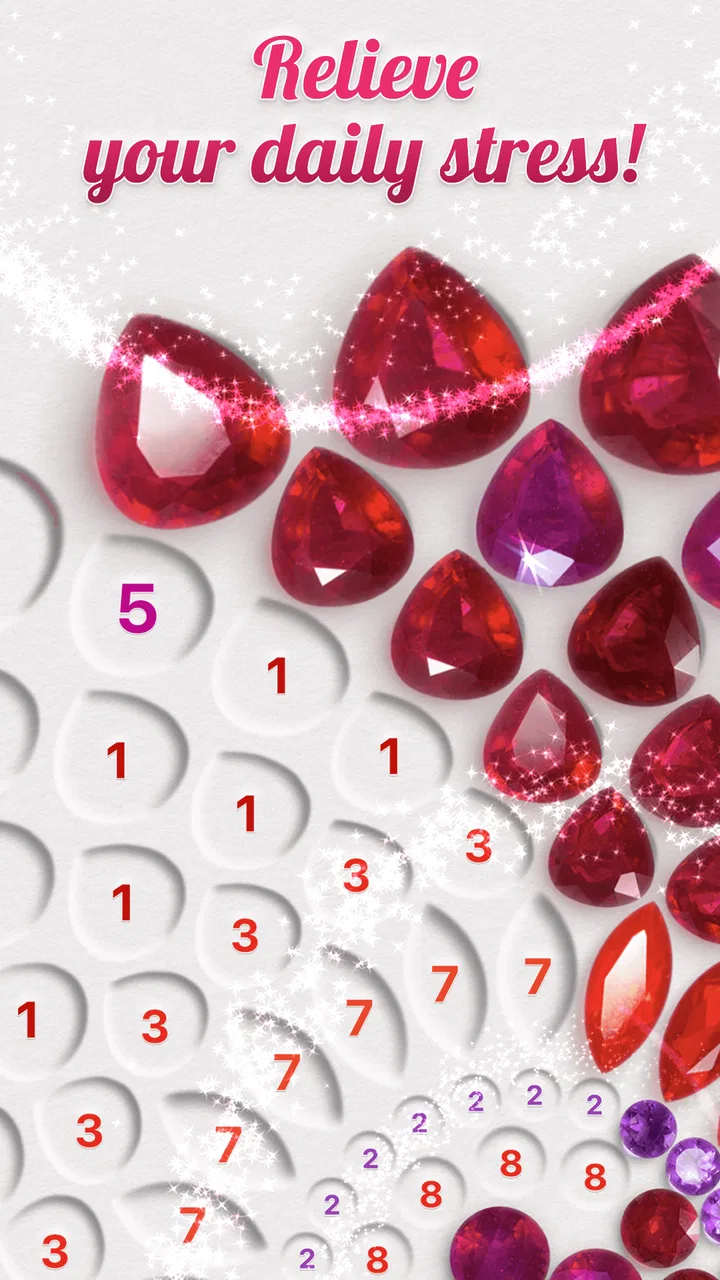
I found Dazzly: Color by Number Game most appealing when I wanted something gentle to do with my hands rather than another demanding game to master. It turns detailed pictures into diamond-art style coloring exercises, using numbered sections and bright gems instead of a traditional brush. The result is simple to understand, pleasantly repetitive, and surprisingly effective at giving my attention somewhere calm to go.
That simplicity is also the key to judging it fairly. This is an entertainment app from GEODE, not a drawing studio, a competitive puzzle game, or a replacement for making physical diamond art. I would recommend it to someone who enjoys orderly visual tasks and wants a low-pressure way to unwind. I would be more cautious with it for anyone who needs deep creative control, dislikes repetition, or expects every part of the experience to remain completely free.
How the coloring experience feels in everyday use
The basic routine is immediately understandable. I choose an image, select a color or numbered group, and tap the matching spaces until that portion is complete. The picture gradually becomes more polished, which gives the activity a clear sense of progress without asking me to plan a composition or decide which colors belong where.
You May Also Like

 Google Keep - Notes and lists
Google Keep’s Quiet Growth Shows the Appeal of Simpler Notes
As mobile work gets busier, Google Keep keeps winning a simple contest: capture a thought quickly, find it later, and get on with the day.

 Blood Strike: 2.5 Anniversary
Blood Strike’s Loadouts Turn Every Drop Into a Tactical Gamble
A close look at Blood Strike’s custom loadouts: how fast access to signature weapons reshapes its battle royale rhythm, rewards preparation, and narrows the gap between fights.

 Pandora - Music & Podcasts
Pandora’s Music Is Easy to Start, but Harder to Recover
Pandora’s strength is its low-effort path from a seed to a station. Its weak spot is how much confidence it asks you to place in connection, setup, and quiet recovery.

 8 Ball Pool
 Is Built on Rivalries, Rematches, and Routine
A close look at the rivalries, rematches, shared routines, and unanswered safety questions that turn a quick pool match into a persistent mobile community.

 Samsung Music
’s Quiet Strength Is Playing What You Already Own
Its reach comes less from spectacle than from dependable access to a personal library. That simplicity is both the app’s strongest retention engine and its ceiling.

 AccuWeather: Weather Radar
AccuWeather Review: A Quick, Clear Forecast for Everyday Decisions
For everyday plans, the best forecast is the one you can understand quickly. AccuWeather makes rain timing, radar, and local conditions easy to act on, with a few trade-offs.
More From Our News Desk



That makes it especially convenient in short sessions. I can open it while waiting for an appointment, after finishing dinner, or during a quiet break when I do not have the energy for a story-heavy game. A picture does not require the same mental commitment as a long level, and I can stop after completing a small section without feeling that I have abandoned a complicated task.
The diamond-art presentation gives the familiar color-by-number format a more tactile-looking finish. Even though I am tapping on a screen, the completed areas have a decorative, gem-like appearance. I found that visual payoff more satisfying than a plain flat coloring page because the image seems to gain texture as it fills in.
My favorite use case was a deliberately short evening session. Instead of scrolling through social media when I was tired, I spent a few minutes filling a single color group, then stopped when the image looked noticeably more complete. That did not turn the app into a medical treatment or guarantee relaxation, but it did give me a quieter activity with a visible endpoint.
The strongest part of Dazzly is its low decision load. I am not choosing a palette, correcting proportions, or worrying about whether a stroke looks professional. The app gives me a small, clear action and a visual reward for completing it. For people who find open-ended creative apps intimidating, that structure can be a real advantage.
Why the format works better than ordinary digital coloring for some people
Traditional coloring apps often ask users to select a brush, choose a shade, manage a canvas, and decide how carefully to stay inside an outline. Dazzly removes most of those decisions. The numbered areas tell me what to do next, so the experience feels closer to sorting and completing than to drawing.
That distinction matters after a long day. I can enjoy a creative-looking result without having to produce the creativity from scratch. It is also useful for people who like completing collections of small tasks. Every filled region acts as a tiny checkpoint, and the finished image provides a stronger payoff than a screen full of unrelated taps.
Compared with a physical diamond-art kit, the app is far more convenient. There is no table covered with beads, no need to protect an unfinished canvas, and no risk of spilling tiny pieces. I can use it anywhere the phone is available. The trade-off is equally clear: the screen cannot reproduce the physical sensation of picking up and placing real diamonds, so users seeking a hands-on craft will probably prefer an actual kit.
Compared with a conventional puzzle game, the challenge is intentionally light. I am not solving a mystery or learning a complex system. The satisfaction comes from steady completion and the changing image. That makes it suitable for decompression, but it may feel too passive for players who want strategy, surprise, competition, or a strong difficulty curve.
Small habits that make the app more enjoyable
I get more from it when I treat each picture as a short project instead of trying to finish everything in one sitting. Choosing one color group and stopping at a natural visual boundary keeps the activity relaxing. Trying to rush through every remaining area can turn a calming exercise into a chore.
Another useful habit is to begin with a section that is easy to identify rather than jumping randomly around the image. Completing a recognizable object or a broad area gives me a clearer sense of progress. I also find it less tiring to alternate between larger, obvious sections and smaller detailed ones instead of repeatedly working on the most intricate area.
For a child, the numbered structure can make the activity approachable, especially because the content rating is Everyone. I would still regard it as a shared-device activity for younger users rather than assuming the child will manage every screen or purchase decision independently. The simple interaction is accessible, but the presence of optional spending means an adult should remain aware of how the device is configured.
For an adult, the same structure works as a screen-based break. I would not use it while driving, during work that requires concentration, or as a substitute for sleep. Its benefit is practical and modest: it gives restless attention a contained visual task. That is enough to make it worthwhile, but it should not be oversold as something more profound.
Where the experience starts to feel limited
The main weakness is repetition. Once the novelty of filling gem-like sections wears off, the core interaction remains the same: identify the correct number and tap the matching spaces. People who enjoy the first few images may eventually want more variety in how they interact with the artwork.
This is also not the right choice if your idea of coloring means personal expression. I cannot freely repaint an area in a completely different shade just because I prefer it. The numbered design controls the intended result, which protects the finished image but limits experimentation. A freehand drawing app or a more flexible coloring book would be better for someone who wants to invent rather than complete.
Fine details can create friction on a smaller phone screen. When many tiny areas sit close together, accuracy and patience matter more. I sometimes had to slow down and check that I was working on the intended color group instead of tapping quickly. That is not a serious flaw, but it changes the mood: the app feels less soothing when I am trying to finish a dense cluster in a hurry.
The free price makes trying it easy, but optional in-app purchases ranging from $2.99 to $99.99 per item deserve attention. I would install it without paying first and decide only after understanding how much of the available experience suits me. Anyone who wants a strictly no-cost activity should check the purchase controls on the device before handing it to a child.
That pricing range also affects my recommendation for frequent users. Casual users can treat the app as a free way to sample the format. Dedicated fans may be tempted to spend more as they continue, so it is sensible to set a personal limit rather than making purchases impulsively whenever a new image looks appealing. The app is more enjoyable when the spending remains deliberate.
Another trade-off is the screen itself. Physical diamond painting has a slower setup but a stronger craft feeling and a finished object that can exist outside the phone. Dazzly wins on convenience and cleanliness, while a real kit wins on material satisfaction. Neither completely replaces the other, and choosing between them depends on whether portability or tactile work matters more to you.
Who should install it, and who should look elsewhere
I think Dazzly is a good fit for people who like color-by-number activities, decorative images, quiet completion loops, and short sessions. It can suit someone who wants a simple evening distraction, a child who enjoys following visual instructions, or a user who likes seeing a picture emerge piece by piece without learning complicated controls.
It is also a sensible option for people who usually avoid drawing apps because they do not feel artistic. The numbered format removes the fear of making a bad creative decision. I can concentrate on consistency and progress, then enjoy an attractive result that does not depend on my drawing ability.
I would skip it if you need a game with meaningful choices, changing objectives, or a strong sense of challenge. I would also choose a different app if I wanted to sketch freely, import my own artwork, or build a personal color palette. Those expectations do not match the controlled nature of this experience.
Users with limited patience for advertisements, locked content, or purchase prompts should approach carefully and decide whether the free portion is sufficient before becoming invested. I would not describe the app as a complete substitute for every other coloring option. Its strength is a particular kind of guided, decorative relaxation, and it is best when that is exactly what I want.
Device details and practical expectations
Dazzly runs on Android devices using version 8.0 or later, which makes it accessible to many older phones as well as newer models. The current version is 26.07.3. I would still expect the experience to feel more comfortable on a screen large enough to show small numbered areas clearly, especially when working on detailed images.
The app is free to install, and its Everyone age rating makes the basic concept broadly approachable. It has reached more than five million installs, with an average rating of 4.6 from roughly 150,000 ratings and about 7,100 written reviews. Those figures suggest that the format has found a substantial audience, although popularity does not remove the personal question of whether repetitive tapping feels relaxing or tedious to you.
The developer, GEODE, has positioned the app in entertainment rather than as a professional art tool. That is the right way to think about it. I open it for a pleasant diversion, not to learn illustration, produce an original design, or replace a physical hobby. Keeping that expectation in mind prevents most disappointment.
If you are deciding whether to try it, I would start with a free session when you have ten quiet minutes. Pay attention to your reaction to the repeated tapping, the visibility of the small sections, and whether the gradual image completion feels rewarding. Those three points tell you more about compatibility than the store summary alone.
My verdict after weighing the strengths and weaknesses
Dazzly: Color by Number Game is at its best as a calm, guided screen activity with a clear visual payoff. I like that it turns diamond-art aesthetics into something portable and tidy, and I appreciate that I can begin without learning a complicated system. The numbered workflow is welcoming, especially when I want creativity without the pressure of making artistic choices.
Its limitations are equally important. The interaction can become repetitive, detailed areas may demand slower tapping, and optional purchases mean that “free” should not be interpreted as unlimited access without spending. The app also cannot offer the physical satisfaction of real diamond painting or the freedom of an open drawing canvas.
For me, the recommendation is straightforward: install it if you enjoy completing visual patterns and want a low-effort way to occupy a few quiet minutes. Try something else if you want strategy, freehand expression, or a tactile craft. Within its narrow goal, GEODE has made a polished and approachable entertainment app, and it earns its place on my phone when I need a small, orderly break rather than a demanding game.
FAQs for Dazzly: Color by Number Game
01What is Dazzly: Color by Number Game?
Dazzly: Color by Number Game is a relaxing coloring app centered on sparkling, jewel-like artwork. Instead of using traditional paints, you fill numbered areas with colorful gems to complete pictures. The app includes many categories and designs, making it suitable for short sessions or longer creative breaks. Its simple controls allow beginners to start coloring immediately, while the polished visuals and glitter effects make completed images feel rewarding.
02Is Dazzly: Color by Number Game free to download and play?
Dazzly can generally be downloaded for free, but it includes optional in-app purchases. Some pictures, gem colors, tools, or additional features may require payment, and the app may also offer a subscription depending on the platform and current version. Free content is available, although users who want access to the complete catalog should review the purchase and subscription details carefully before confirming payment.
03Does Dazzly require an internet connection?
An internet connection may be needed for the initial download, account-related features, advertisements, store content, and access to some artwork. Certain previously loaded coloring pages may remain available offline, but this can vary according to the app version and device. If you plan to use Dazzly while traveling or without mobile data, it is best to open the desired pictures beforehand and check which content remains accessible.
04Is Dazzly suitable for children?
Dazzly is easy to understand and can appeal to children because coloring mainly involves selecting numbered areas and matching them with the correct colors. However, parents should check the recommended age rating, advertising, and in-app purchase settings before allowing independent use. Some designs or promotional content may not be aimed at very young children, so parental supervision and purchase restrictions are advisable.
05What are the main advantages and disadvantages of Dazzly?
The main advantages are its relaxing gameplay, attractive sparkling artwork, straightforward number-matching controls, and large selection of pictures. It works well for casual entertainment and stress-free creative sessions. On the other hand, the experience can become repetitive for players who prefer more active gameplay, while advertisements, locked content, and optional purchases may interrupt progress. Device storage and battery use can also increase if many images are downloaded.
Pros
- Relaxing gameplay suitable for short breaks or longer sessions.
- Large variety of colorful designs across multiple categories.
- Simple tap-to-color controls are easy for beginners to learn.
- Regular content updates can keep the picture library feeling fresh.
- Finished artworks are easy to save and share with others.
Cons
- Many premium pictures and features may require in-app purchases.
- Ads can interrupt the experience
- especially between coloring sessions.
- Some images use tiny sections that become tedious to fill in.
- The game may need internet access for certain content and features.
- Progress and rewards can feel slow without watching ads or spending money.

Dazzly: Color by Number Game
Gallery